Someone asks me this every week, and it's almost always the same story: they've got a parts list open in another tab, they've watched four YouTube videos, and they're more confused than when they started. The problem isn't that picking a processor is hard. It's that most advice online is written for people building a $4,000 showpiece machine, not for someone who just wants their games to run at a steady frame rate without melting their budget.
Here's what actually matters when you choose a CPU for your custom PC build: the resolution you play at, the GPU sitting next to it, and the platform you're buying into. Everything else is noise until you've nailed those down.
Key Takeaways
- Your GPU sets your ceiling. The CPU decides whether you actually reach it.
- 6 cores is the sensible floor for gaming in 2026. 8 cores is the sweet spot if you stream, edit, or multitask heavily.
- Resolution changes everything: at 1440p and 4K, the CPU matters far less than at 1080p.
- Budget roughly 25–30% of your total build cost on the processor—not more, unless you're doing workstation work.
- Socket longevity is worth real money. A platform that supports one more generation of chips saves you a full motherboard swap later.
How to choose the right CPU for your custom PC build without overspending
The mistake I see constantly: people walk into a build thinking the CPU is the "brain" and therefore the most important part. It isn't. For gaming, the graphics card does the heavy lifting, and the processor just needs to keep pace. The catch? "Keeping pace" is a moving target, and it depends entirely on what you're asking the machine to do.
So before you look at a single model number, answer three questions honestly.
What are you actually doing with this machine?
A pure gaming rig has different needs than a video editing workstation, and the gap is wider than most people assume. Games care about single-core performance and decent clock speeds. Rendering, compiling, and streaming care about core count and memory bandwidth. If you're 90% gaming with occasional Photoshop, buy for gaming and stop worrying about core counts.
Here's the thing: I built a machine two years ago with a 12-core chip for a "gaming and light editing" workload. Guess which one actually used those extra cores? Almost nothing. My games ran identically to a 6-core build I'd made for a friend. I paid roughly 40% more for silicon that sat idle.
What resolution are you playing at?
This is the single most misunderstood factor. At 1080p, the CPU works hard to feed frames to the GPU, so a faster processor genuinely matters. At 1440p, the GPU becomes the bottleneck in most titles. At 4K, the processor is almost irrelevant—any modern 6-core will do, and spending an extra $150 on a faster chip buys you maybe 2–3 frames.
Franchement, this is where I see the most wasted money. Someone builds a 4K rig and pairs it with a top-tier processor, then wonders why their frame rate didn't move when a cheaper chip would've been indistinguishable.
What is your total budget?
Work backwards. If you're spending $1,200 on a complete build, the processor should land somewhere around $180–$280. That leaves room for a GPU that actually matters and a motherboard that won't bottleneck you. If you're at $2,000, you can push the CPU budget to $300–$400, but I'd still argue the GPU deserves the bigger slice.
| Use case | Cores | Typical budget share | What to prioritise |
|---|---|---|---|
| 1080p gaming | 6 | 20–25% | Single-core speed |
| 1440p gaming | 6–8 | 22–28% | Balanced cores and clocks |
| 4K gaming | 6+ | 15–20% | Save money, buy GPU |
| Gaming + streaming | 8 | 25–30% | Core count |
| Video editing | 8–16 | 30–40% | Cores and memory lanes |
How do I choose the right CPU for me?
Match the chip to your heaviest regular workload, then subtract a tier if budget is tight. That's the whole method.
Concretely: if your heaviest task is gaming, buy the fastest 6–8 core chip you can afford within your GPU's budget envelope. If your heaviest task is video export or 3D work, you're buying cores, and the gaming frame rate becomes a secondary concern. If you do both, you're compromising, and the honest answer is that no processor is perfect for both—you pick which one you're willing to lose a little on.
One more thing people skip: check the socket and the chipset on your motherboard. A processor that doesn't fit is a very expensive paperweight. And check the platform roadmap, because buying into a socket that's at the end of its life means your next upgrade is a whole new motherboard, not just a chip swap.
Is Ryzen 7 overkill for gaming?
For pure 1080p gaming, yes—you're paying for cores your games won't use. A Ryzen 5-tier chip generally delivers the same frame rates in most titles.
But "overkill" depends on the rest of your build. If you're pairing it with a high-end GPU at 1440p and you also stream, record, or run background applications while playing, those extra cores earn their keep. The real answer: it's overkill only if you'll never use the extra threads. Most people who buy it do use them, just not in ways they anticipated.
Is 6 cores or 8 cores better?
8 cores is better if you do anything beyond gaming on the machine. 6 cores is better value if gaming is genuinely all you do.
The reasoning is straightforward. Games today rarely scale past 6–8 threads effectively, but your operating system, browser, Discord, and background services are all competing for the same cores. With 6 cores, you're juggling. With 8, you have breathing room. The price difference between the two tiers is usually $50–$100, which is small enough that I'd lean toward 8 unless you're squeezing every dollar toward a better GPU.
Is a $2,000 PC good for gaming?
Yes, comfortably—provided you don't dump half of it into the processor.
At that price point you can build a machine that handles 1440p at high settings with room to spare, or 4K at reasonable settings. The split I'd recommend: roughly $350–$450 on the GPU, $250–$350 on the CPU, $150–$200 on the motherboard, and the rest across RAM, storage, power supply, and case. The most common mistake I see at this budget is over-investing in the processor and under-investing in the graphics card, which produces a machine that benches well and games worse than a cheaper, better-balanced build.
CPU vs GPU: where your money should actually go
If I had to reduce this entire article to one sentence, it would be this: spend on the GPU until it stops being the bottleneck, then spend on the CPU.
I've watched people agonise over a $40 difference between two processors while their graphics card was three tiers too weak for their monitor. That's backwards. A mid-range CPU with a strong GPU will outperform a flagship CPU with a weak GPU in nearly every gaming scenario, and it's not close.
- Upgrade the GPU first when frame rates disappoint you
- Upgrade the CPU first when you see stuttering, frame drops, or slow application switching
- Upgrade the CPU first if your work involves rendering, encoding, or compilation
- Never upgrade the CPU to "future-proof" a machine that's GPU-limited today
The one exception is simulation-heavy genres. Strategy games, flight simulators, and large-scale sandbox titles lean hard on the processor, and there a stronger chip genuinely changes the experience. If that's your library, weight the CPU more heavily than the table above suggests.
How to pick a CPU cooler
Your processor choice dictates your cooling requirement, not the other way around. The higher the power draw, the more you need to spend here—and skipping this step is how people end up with a machine that thermal-throttles under load.
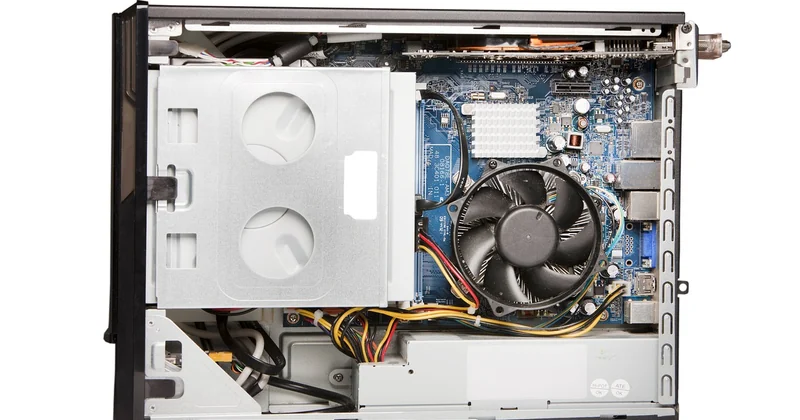
Rough rules from my own builds: a 6-core mainstream chip runs comfortably on a decent air cooler in the $35–$60 range. An 8-core or higher chip, especially one you plan to overclock, wants either a larger air cooler or a 240mm liquid unit—budget $80–$140. Enthusiast-tier chips with high power limits want 280mm or 360mm radiators, and at that point you're spending $150+ just to keep the thing from throttling.
Check two numbers before buying: the cooler's rated TDP support, and the physical clearance in your case. I once bought a beautiful dual-tower cooler that didn't fit under my case panel by about 4mm. That was an annoying week.
A quick note on integrated graphics
Many processors include basic integrated graphics. For a dedicated gaming build, you won't use them—your GPU handles display output, and integrated graphics add cost you don't need. But if you're building a compact office machine or want a fallback when troubleshooting a dead GPU, a chip with integrated graphics is genuinely useful. It's a small premium for real convenience.
The platform decision nobody talks about
Buying a processor means buying into a socket, and sockets have lifespans. This is the factor that separates a good build from a great one, and it barely gets mentioned in most buying advice.
A chip on a mature platform might be cheaper today, but if the manufacturer has already announced the end of that socket, your next upgrade means replacing the motherboard and possibly the RAM too. A chip on a fresh platform costs a bit more now but gives you a cheap, drop-in upgrade path two or three years down the line.
My own rule: if the price difference is under $100, I take the platform with the longer roadmap. I've done both, and the builds where I chose longevity ended up cheaper over a five-year window, every time.
Should you wait for the next generation?
Only if you're within a few weeks of a launch you know is coming. Otherwise, buy now. There is always a newer chip around the corner, and waiting indefinitely means never building anything. A good processor today beats a hypothetical better one in six months.
What I would actually do
Pick your resolution. Pick your GPU. Then buy the cheapest 6-core (or 8-core, if you multitask) processor that won't hold that card back, on the newest socket you can afford.
That's it. No benchmarks spreadsheet required, no endless forum threads. The people who agonise the longest usually end up with the same build they'd have chosen in twenty minutes—just with three more weeks of anxiety attached.
And if you take nothing else from this: your processor is a supporting actor, not the lead. Build accordingly, and you'll have more money left for the part that actually renders your frames. Which, curiously, is the part most people under-buy.